When you download or stream a movie, “quality” isn’t just about how sharp the picture looks. It’s also about whether the file plays smoothly, whether subtitles match, and whether the audio track sounds rich without delays or distortion. That’s why this fzmovies Quality Guide focuses on one practical skill: choosing the right resolution, format, and audio track for the device you use.
By the end of this guide, you’ll know what to select for clearer visuals, which formats tend to cause fewer playback issues, and how to pick the best audio track for dialogue and surround sound. The goal is simple: help you avoid the common “it played, but it didn’t look or sound right” problem before you hit play on fzmovies.
Start With Your Viewing Device and Internet Constraints
Before you choose 4K or a high-bitrate file, confirm what your device can actually handle. A 4K TV will reveal more detail than a 1080p monitor, but a phone on mobile data may struggle with large files or higher bitrates. In that case, a slightly lower resolution can look just as crisp on a small screen and play more reliably.
Next, think about your bandwidth and playback stability. If buffering happens, it’s often the combination of resolution and bitrate, not only the resolution label. For a smoother experience, prioritize the resolution your connection can sustain without frequent stalls.
Finally, consider your audio setup. If you use a basic TV speaker, you may prefer an audio track that emphasizes clear dialogue. If you have a soundbar or home theater, you can benefit more from surround-capable audio tracks—assuming your playback device supports them.
How to Choose the Right Resolution Without Overpaying in File Size
Resolution choices usually show up as 480p, 720p, 1080p, 1440p, or 2160p (often labeled as 4K). Higher resolution can improve fine detail, but only when the display is large enough and the bitrate is sufficient to preserve that detail. Otherwise, the difference may be subtle, even if the file size is much larger.
For small screens like laptops and phones, 720p can look excellent because viewing distance reduces the impact of missing pixels. If you watch on a 24–32 inch monitor from a typical distance, 1080p often provides a noticeable upgrade without pushing huge download sizes. On a 40–55 inch TV, 1080p still looks good, but 4K becomes more meaningful when the content is sharp and well-mastered.
When you see 4K options, don’t assume “best” automatically. Look for consistent playback performance and an audio track that matches the experience you want. If your connection is limited, a 1080p file with better audio clarity may feel superior to a 4K file that buffers or compresses too aggressively.
Quick Resolution Rules That Match Real Life
- 480p/360p: Use mainly for slow connections or offline storage constraints. Expect softness and less detail.
- 720p: A strong everyday choice for phones, smaller screens, and stable playback over average internet.
- 1080p: The best balance for most TVs and monitors when you want clear detail without huge files.
- 4K (2160p): Best when you have a 4K display, reliable bandwidth, and a bitrate that preserves detail.
Understand Formats: MP4, MKV, and Why They Change Playback Feel
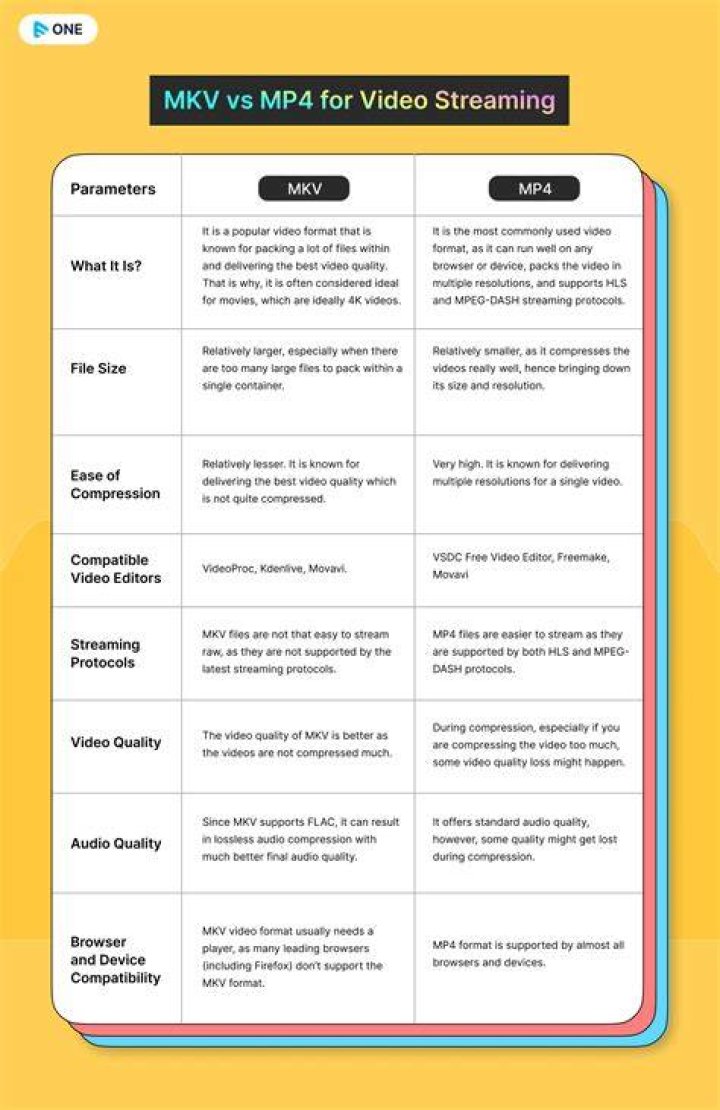
The format you select—commonly seen as MP4 or MKV—is often a “container.” That means it packages video and audio streams together along with metadata like subtitles and chapters. Two files can have the same resolution but different formats, resulting in different playback behavior on certain players.
MP4 is widely supported across devices and apps. If you want the safest “it should play everywhere” option, MP4 is frequently the first place to look. It’s also commonly used for streaming-friendly playback scenarios.
MKV is popular because it can store multiple audio tracks and subtitle tracks efficiently. Many users like MKV for flexibility, especially when they want to switch audio languages or subtitle styles. If your device player supports MKV reliably, it can be a convenient choice.
What to Check Beyond the File Extension
Even with MP4 and MKV, the video codec and audio codec matter. A file can be “1080p MP4” but still play poorly if the codec is unusual or hardware decoding support is limited on your device. If you’ve ever seen stuttering, that’s often a codec mismatch rather than the resolution itself.
When choosing a file on fzmovies, aim for options that match your device’s typical capabilities. If you’re using a smart TV app or a media player app, pick the format that that app handles best. Consistency beats trying every “best-looking” option that might struggle during playback.
Choose the Best Audio Track for Dialogue Clarity and Surround Sound
Audio tracks can be the biggest quality difference you experience, especially if you watch action scenes where explosions mask dialogue. Many listings offer multiple audio options such as AAC, AC-3 (Dolby Digital), E-AC-3 (Dolby Digital Plus), DTS, or DTS-HD (depending on the source). The right pick depends on what your system can decode and how you want the soundtrack to feel.
For most viewers, dialogue clarity is the priority. If you notice muffled voices or music that overwhelms speech, choosing a different audio track can immediately improve the balance. A stereo track can also be more stable if your device struggles with certain surround formats.
If you have a soundbar or home theater, surround-capable tracks can add depth and directional effects. However, you should only choose surround audio when your playback device supports it. Otherwise, you may get downmixed audio, latency issues, or occasional dropouts.
How to Pick Audio Track Type Based on Your Setup
- Stereo (2.0 / 2.1): Great for TV speakers and most headphones. Often the most universally compatible.
- Surround (5.1): A good upgrade for soundbars and home systems that support 5.1 decoding.
- Atmos and advanced mixes: Best if your device explicitly supports them. If not, you may lose the intended effects.
Watch for Audio Language and Track Priorities
Sometimes multiple audio tracks exist in different languages, plus separate tracks for commentary or alternate mixes. If you’re choosing an English movie for example, confirm you’re selecting the language you actually want. Many viewers also prefer a “main” track rather than a descriptive commentary mix unless that’s what they’re looking for.
When subtitles are involved, audio and subtitle timing can matter. If the platform allows track syncing or if you can compare quickly, pick the audio track that stays aligned with subtitles throughout the movie.
Bitrate, Size, and Why “Higher Resolution” Isn’t Always “Better Quality”

Resolution tells you how many pixels are shown, but bitrate tells you how much data is available to represent those pixels smoothly. If a 4K file uses aggressive compression to keep the bitrate low, you may see blockiness or banding in darker scenes. A well-balanced 1080p file can sometimes look cleaner than an overcompressed 4K option.
When you see multiple versions on fzmovies, compare resolution with expected playback stability. If a higher-resolution option is significantly larger, it may increase load times and buffering risk. If you’re watching online, that matters more than if you’re playing offline on a stable connection.
For the best “value,” select the highest resolution you can play without interruptions, then choose the audio track that matches your speakers. That pairing—reliable video plus satisfying audio—usually beats chasing one spec alone.
Signs You Picked the Wrong Version
- Pixelation in fast scenes: Often indicates low bitrate for that resolution.
- Frequent buffering: Suggests the file is too demanding for your connection.
- Audio crackling or missing channels: Can be a codec support issue rather than true “bad audio.”
- Subtitle mismatch: Can happen when track selection doesn’t match the intended release structure.
Subtitles and Track Pairing: Keep Language and Timing Consistent
Even though this guide focuses on resolutions, formats, and audio tracks, subtitle choice is tightly connected to your track pairing decisions. If you pick a version with multiple subtitle tracks, it’s usually easier to match the language and style you want. If you only have one subtitle track, then your best bet is to ensure it syncs well with your chosen audio.
Some viewers switch between audio languages but keep the same subtitles. That can work well when the release supports track alignment properly. If you notice drift over time, try switching to a different audio track rather than assuming the subtitles are always wrong.
On devices that support multi-track selection, you may be able to change audio and subtitles on the fly. Still, it’s safer to choose a version where the audio and subtitle tracks are clearly paired and consistently timed.
Recommended Setup Recipes by Use Case

Different viewing setups deserve different defaults. Instead of guessing every time, you can use a few simple recipes based on device and audio hardware.
The idea is to choose a stable resolution and compatible format, then match the audio track to your speaker capability. When you follow a consistent approach, you reduce the chance of unpleasant surprises mid-movie.
Recipe 1: Mobile Data and Small Screens
- Resolution: 720p when possible, step down if buffering starts.
- Format: MP4 for broad compatibility with most apps.
- Audio: Stereo or the most compatible track for clear dialogue.
Recipe 2: Living Room TV With a Soundbar
- Resolution: 1080p as the baseline; consider 4K if your bandwidth and device are stable.
- Format: MKV if your player handles it smoothly; otherwise use MP4.
- Audio: 5.1 when supported, because it usually improves impact and surround separation.
Recipe 3: Home Theater and Dedicated Media Player
- Resolution: 4K when you have both the display and stable playback performance.
- Format: MKV for track flexibility if your media player supports it reliably.
- Audio: Surround or advanced mixes when your system can decode them without latency.
Common Mistakes When Choosing Resolution Format and Audio Tracks
Many viewers focus on resolution alone, then wonder why their experience is underwhelming. A 4K video can still feel “meh” if the audio is poorly matched, the codec isn’t well-supported, or the file buffers continuously. Likewise, an excellent audio track can be ruined if the video stutters and makes the soundtrack feel unstable.
Another frequent mistake is choosing an advanced audio mix without confirming device support. Even if the audio is high quality in theory, your system may downmix it in a way that changes balance or reduces channel separation. If you want a consistent experience, pick audio tracks that your device handles well.
Finally, don’t ignore subtitles when deciding version. If you prefer a certain subtitle language or style, selecting a file that includes that subtitle track can save time and reduce sync issues. Track compatibility often matters more than you expect, especially for long movies with many scene changes.
Final Thoughts
Choosing the right resolution, format, and audio track is the fastest way to upgrade your viewing quality without guessing. Use device capability and connection stability to decide resolution, pick the format your player handles best, and match the audio track to your speakers for clear dialogue and immersive scenes. If you want a practical place to apply these choices consistently, fzmovies can help you sort through options so you spend less time troubleshooting and more time watching.
