Streaming on today’s internet is convenient, but it also creates privacy risk. Every click, request, and playback session can reveal device details, IP information, viewing behavior, and sometimes even account metadata. The goal of secure streaming best practices is simple: reduce what others can infer and keep your device and accounts protected while you enjoy content.
In this guide, you’ll learn a practical, step-by-step approach to protecting privacy and improving safety during streaming sessions—especially when you use kool.to. Instead of generic advice, you’ll get actionable controls you can apply to your browser, network, devices, and account habits so that your streaming stays safer by default.
Start with a threat model for streaming privacy
Before changing settings, it helps to decide what you’re trying to prevent. For streaming privacy, the most common concerns include third-party tracking, IP address exposure, account leakage, malware via fake download links, and data collection through browser identifiers. When you know which risk matters most, you can apply the right controls without overcomplicating your setup.
A simple threat model for streaming usually looks like this: (1) websites and trackers you visit, (2) your network (Wi‑Fi, ISP visibility), (3) your device (malware, browser extensions), and (4) your accounts (password reuse, weak security). As you apply best practices, you’ll cover each layer so that no single weakness breaks your overall privacy.
Harden your browser to reduce tracking and fingerprinting
Your browser is where most streaming-related data flows. Even if a site doesn’t “steal” information, trackers and fingerprinting techniques can still build profiles from subtle signals. Start by tightening the browser environment so your identity is harder to infer during playback.
First, review installed extensions and remove anything you don’t truly need. Extensions have access to browsing data and can unintentionally expose sessions. If you use an ad blocker, keep it to reputable sources and avoid random “video helper” tools that promise extra speed or downloads.
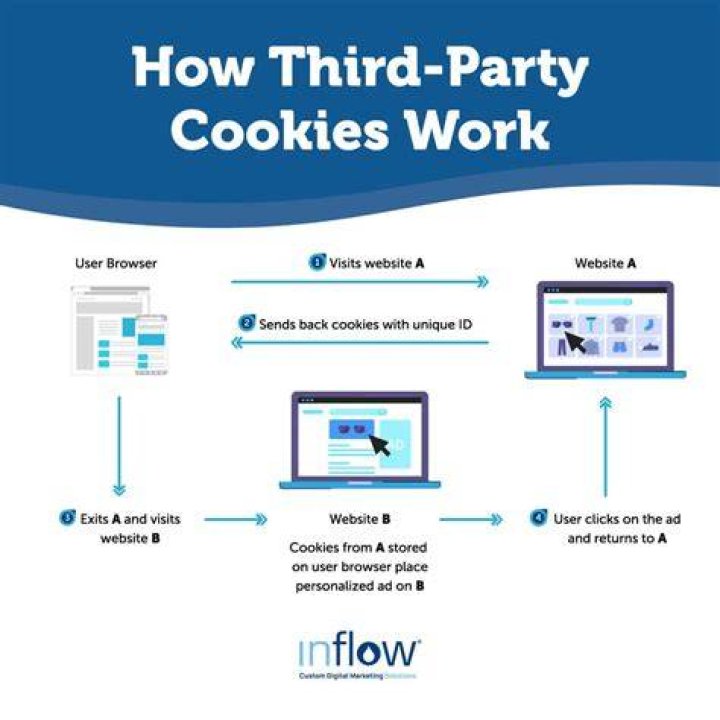
Next, focus on privacy settings. Use a modern browser, enable privacy-focused features like tracking protection where available, and consider limiting third-party cookies. Many streaming sites still require cookies for sessions, but reducing cross-site tracking makes it harder for advertisers and analytics networks to follow you across the web.
Finally, pay attention to browser fingerprinting. Fingerprinting can come from fonts, screen characteristics, time zone, installed plugins, and unique browser behaviors. You don’t need to chase perfect anonymity; instead, aim for consistent, low-leak configurations. When your browser environment is stable and less “unique,” it reduces the ability to correlate sessions.
If you’re using kool.to, the safest approach is to treat it like any other streaming destination: harden the browser, then access the content only through trusted workflows. That mindset keeps your privacy controls working the same way across sessions, not only on one site.
Secure your network: avoid risky Wi‑Fi and reduce exposure
Network privacy is often overlooked, but it’s a major part of secure streaming. On public Wi‑Fi, attackers may try to intercept traffic or trick users with malicious captive portals. Even on private networks, your ISP can sometimes observe metadata like connection timing and destination domains.
When possible, stream from a trusted network you control or that you fully understand. Avoid open Wi‑Fi in places where you don’t know the operator. If you must use public Wi‑Fi, use strong transport security protections and consider using a reliable privacy tool that protects traffic from local interception.
Also, check your router and device baseline. Keep firmware updated, disable remote administration if you don’t need it, and ensure your devices are not running outdated operating systems. These steps may sound general, but they directly affect streaming safety because your browser and media apps rely on secure communication with the internet.
Use account hygiene to prevent session and data leaks
Accounts are where privacy becomes personal. If you reuse passwords across services, a breach elsewhere can expose your streaming accounts. If your email is compromised, attackers can reset passwords and gain control even when your streaming platform uses good security practices.
Start with a password manager so you can use unique, high-entropy passwords for every service you use. Then enable multi-factor authentication (MFA) wherever it’s available, especially on your email provider. In most real-world scenarios, securing your email account prevents far more damage than any single streaming setting.
Be mindful of session behavior too. If your platform supports it, log out of sessions on devices you no longer use. Also review devices that have active logins. If you see unfamiliar devices or locations, secure your account immediately by rotating your password and checking your MFA settings.
Beware of “safe download” scams and malicious streaming paths
One of the most serious streaming safety risks is malware delivered via social engineering. Scammers often disguise malicious links as “download the player,” “update codec,” or “get premium for free.” These pages may look plausible, but they can deliver spyware, credential stealers, or ransomware.
To stay safe, avoid downloading unknown executables or “video players” from untrusted sources. Treat any prompt that asks for permissions outside the normal browser flow as suspicious. If a page wants you to install software to watch content, verify the source and use official channels.
When you encounter shortened links or pop-ups, don’t rush. Scammers rely on urgency and confusion. If something feels off, close the tab and navigate using the site you intended to use. For users accessing streaming content through kool.to, the same rule applies: keep your browsing flow clean and avoid redirects that do not look like standard navigation.
Protect yourself from browser and device compromise
Even good privacy settings won’t help if your device is compromised. Malware can steal cookies, capture keystrokes, modify browser traffic, or inject ads that lead you to malicious pages. To improve safety, focus on the basics: updates, careful installation, and minimal risky software.
Keep your operating system and browser updated. Many security patches address vulnerabilities that can be exploited through malicious sites or crafted scripts. Then remove software you don’t recognize, especially “toolbars,” “download managers,” and browser extensions you didn’t intentionally install.
Consider running reputable anti-malware tooling and performing periodic scans. If you notice unusual browser behavior—frequent pop-ups, unexpected redirects, or videos playing where you didn’t click—treat it as a signal. The most important response is to stop and clean your environment rather than continue streaming while something is wrong.
Manage media privacy: avoid oversharing in screen and audio environments
Secure streaming isn’t only about websites. It’s also about what you accidentally expose through your environment. If you stream while using screen sharing, recording, or video conferencing, your playback could reveal personal details. Even filenames, subtitles, and browsing tabs can disclose what you’re doing.
If you live-stream or participate in video calls, confirm which window you share. Share only the specific content window, not your entire desktop. Also review notification settings so that private messages don’t appear on-screen during playback.
For audio and microphones, ensure unnecessary permissions are disabled. Streaming sites should not need microphone access. When an app asks for permissions unrelated to the playback experience, deny it and look for safer alternatives.
Reduce metadata exposure during playback and browsing
Metadata is the “data about data.” Even when content is encrypted in transit, third parties may infer timing, geolocation signals, device characteristics, and navigation patterns. That’s why secure streaming best practices focus on reducing what can be correlated.
One practical technique is to avoid logging in unless you need to. If you don’t require personalized settings, anonymous browsing can reduce the amount of account-linked telemetry available. If you do use a profile, keep it minimal and avoid mixing multiple identities in the same browser profile.
Also, control how long you stay signed in. A shorter session reduces the risk window if a device is later accessed by someone else. Pair this with clearing sensitive browsing data only when needed. For many users, a balance is best: keep cookies long enough for a smooth experience, but avoid indefinite storage that increases tracking continuity.
Use safe browser profiles for streaming sessions
Browser profiles help separate identities. Instead of mixing streaming activities with everyday browsing, you can create a dedicated profile for streaming tasks. That separation reduces cross-site tracking and limits what data can carry over into other habits.
A dedicated profile also simplifies cleanup. If something goes wrong—unexpected ads, suspicious behavior, or session errors—you can remove or reset only that profile rather than impacting your entire browsing environment. This is especially useful when you explore new streaming sources or new sites.
For users connecting through kool.to, a streaming-only profile can make your privacy routine more consistent. You can set tighter cookie rules, restrict extensions, and manage permissions for that one purpose, while leaving your primary profile untouched.

Apply secure streaming settings step-by-step (a practical checklist)
Below is a consolidated checklist you can follow before and during streaming. The goal is to make privacy and safety improvements easy to apply without turning your workflow into a science project.
- Update your browser and operating system to reduce known vulnerabilities.
- Remove unnecessary extensions, especially anything claiming to “enhance streaming” or “download videos.”
- Enable tracking protection and limit third-party cookies where possible.
- Use strong account security with unique passwords and MFA on your email.
- Avoid suspicious downloads and refuse software prompts that seem unrelated to playback.
- Stream on trusted networks and be cautious with public Wi‑Fi.
- Use permissions wisely and deny microphone or device permissions unless truly required.
- Consider a streaming-only browser profile to keep your session environment isolated.
If you follow this checklist, you’ll reduce tracking opportunities, shrink your exposure to malware, and make account compromise less likely. When you access content through kool.to, your improvements remain consistent because they are applied at the browser, device, and account layers rather than only at the site layer.
How to know if your privacy controls are working
Privacy and safety improvements aren’t always obvious at first. Instead of guessing, you can look for practical indicators that your controls are doing their job. For example, fewer third-party requests and reduced cross-site tracking signals suggest better privacy hygiene.
Check your browser’s privacy or security indicators for warnings. Review cookie controls to confirm that third-party cookies are limited. Also monitor for unexpected redirects, pop-ups, or permission prompts that might indicate a compromised page or malicious content.
If something feels inconsistent—like your browser behavior changing suddenly—that can be a sign that a tracker, extension, or malware component is active. In that case, pause streaming, remove questionable extensions, and run security checks before continuing.
Final Thoughts
Secure streaming is less about finding a single “magic” setting and more about stacking defenses across your browser, network, accounts, and device. When you take privacy seriously at every layer, tracking becomes harder, scams become less effective, and your streaming sessions feel safer day to day. If you’re using kool.to, keep these best practices as your baseline so your streaming experience stays both smooth and protected.
