Watching movies online should feel convenient, not risky. When you visit streaming sites, download apps, or click through ads, you may expose your device to malware, tracking, or scam pages. This privacy and safety guide focuses on one specific goal: helping you watch movies online with stronger protection for your identity and your computer.
Throughout this guide, you will see practical steps you can apply whether you are using watchseries or another streaming platform. The emphasis is on reducing data exposure, verifying sites, and preventing common “gotchas” like fake video players and suspicious pop-ups.
Know What “Privacy Risk” Looks Like When Streaming
Privacy risk is not just about someone “spying” on you. In streaming workflows, your IP address, device details, browser fingerprint, and viewing behavior can be collected or inferred. Even if a site does not sell your data directly, third-party trackers embedded in ads, analytics scripts, or embedded players can profile your activity.
Another common issue is confusion between a legitimate video page and an unsafe redirect page. Many movie sites rely on external links for playback, and that chain can introduce additional tracking or malicious downloads. Understanding the pattern helps you decide what to block, what to verify, and what not to click.
Common sources of tracking
- Advertising networks that record clicks, sessions, and referrer URLs.
- Embedded players that load external scripts from multiple domains.
- Browser fingerprinting using fonts, plugins, screen size, and behavior patterns.
- Account and payment identifiers if you log in or purchase subscriptions.
Use Browser and Network Settings to Reduce Exposure
Start with your browser and network because they shape what information gets sent when you stream. For most people, the biggest improvements come from tightening privacy settings and controlling who can observe your traffic. These steps also reduce the chance that pop-ups or trackers interfere with your experience.
Make privacy protections part of your streaming routine
- Enable a tracker-blocking browser setting (or use reputable privacy-focused browser extensions) to reduce third-party profiling.
- Turn on HTTPS-only browsing when your browser offers it, so you avoid insecure connections.
- Clear or limit site data when you switch between different streaming pages.
- Disable unnecessary permissions like notifications and location for unknown sites.
Understand what an IP address can reveal
Your IP address can be used for approximate geolocation and it can tie viewing sessions across pages. That means the same network can be linked to your activity unless you take steps to add separation. A safer approach is to use privacy-aware network tools and avoid logging into accounts tied to real identity while browsing unfamiliar sites.

Choose Safer Playback Practices That Prevent Malware
Many safety problems happen during playback, not during browsing. Fake “play” buttons, deceptive redirects, and instant downloads can trick you into installing malware or granting permissions. Instead of rushing, adopt a verification mindset: look before you click and treat unexpected downloads as a red flag.
Also, remember that safety is not only about the site itself. Your device can become vulnerable through downloads, permission prompts, or browser extensions that were installed “for streaming.” The safest route is to minimize changes to your system and keep downloads out of the movie-watching flow.
What to avoid during streaming
- Unexpected file downloads when you are trying to watch a video.
- Browser permission prompts that request notifications or system access.
- Installing “streaming players” offered by random pop-ups.
- Clicking through multiple redirect pages to reach “the actual player.”
Use common-sense checks before hitting play
Before playback, check the page for misleading signals such as excessive pop-ups, unusual link labels, or content that looks like an ad. If the player appears inconsistent (for example, one minute it shows a video window and the next it asks you to install something), stop and reassess. A safe streaming session should not require you to install unknown software.
Protect Your Accounts and Personal Identity
Privacy is strongest when your accounts are separated from your browsing behavior. If you log into email, banking, or social profiles on a risky browsing session, you increase the chance of account takeover through phishing or credential harvesting. Even when a site seems safe, you cannot fully control what third-party trackers or scripts are doing on the page.
For watching movies online, you can reduce exposure by limiting the number of accounts you use and by avoiding entering credentials on pages you cannot confidently verify. If you do use a platform like watchseries, treat login as an account management step, not a casual click-through.
Safer account habits for streaming
- Avoid logging into sensitive accounts while on unfamiliar streaming pages.
- Use unique passwords so that one breach does not lead to others.
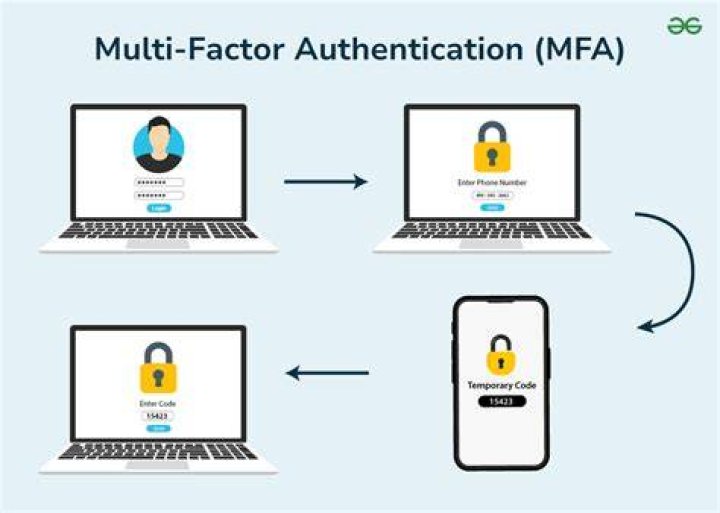
- Enable multi-factor authentication for email and any platform accounts you do use.
- Consider separate browsing profiles for streaming versus daily life.
Verify Links and Watch for Scam Patterns
Not every suspicious page is malicious, but streaming is a category where scams frequently appear. Attackers often mimic “video pages” while directing you toward fake updates, credential prompts, or payment traps. The goal of this section is to help you spot the most common scam patterns quickly, without needing technical expertise.
Red flags that often indicate unsafe sites
- “You must update your player” messages that force downloads.
- Paywall demands that look inconsistent with the rest of the site.
- Unusual domain names that differ slightly from trusted brands.
- Overuse of urgency language like “claim now” or “urgent warning.”
- Survey bait that redirects repeatedly before any playback.
How to cross-check a page before trusting it
If you are unsure, step back and search for context using trusted sources. Look for independent discussions that describe whether the site has a history of redirects, malware, or deceptive playback. Then, confirm that the page you intend to use matches what others describe, especially around video loading behavior.
When the details do not align, treat it as a “do not proceed” signal. In safe streaming, you do not need to prove a site is harmful—you only need to notice that it does not behave like a normal media page.
Secure Your Device So Streaming Doesn’t Become a Risk
Even if you browse carefully, device security determines how harmful a mistake can be. Keeping your system updated, using reputable security software, and reducing the permissions your browser can access all reduce the blast radius. Think of this as layering: one layer helps, but several layers together provide reliable protection.
Device hardening that matters for streaming
- Update your operating system and browser regularly.
- Use reputable anti-malware protection and run periodic scans.
- Keep browser extensions minimal and remove extensions you no longer trust.
- Avoid running downloads as administrators and never install software prompted by pop-ups.
Reduce harm if you click something suspicious
If you accidentally click a pop-up that triggers a download, stop the process and review what changed. Check your downloads folder, scan the file if one appeared, and close suspicious tabs. If you entered credentials on a page you no longer trust, change your password immediately and secure accounts with multi-factor authentication.
Set Boundaries for Ads, Tracking, and Data Collection
Ads are one of the most common privacy challenges in free or ad-supported movie viewing. Even when the main site looks clean, the ad network behind it may track clicks and sessions across domains. That means your watching patterns can be shaped into a profile without your explicit consent.
Instead of accepting every ad flow, set boundaries. Block unwanted tracking where you can, limit what data you share, and avoid clicking ad content that looks like playback controls.
Practical ways to reduce ad-driven tracking
- Block third-party cookies or use a privacy mode when supported.
- Limit cross-site tracking using browser privacy controls.
- Avoid clicking “video” buttons embedded in ads that lead to redirect pages.
- Review notification permissions and revoke anything suspicious.
Recommended Safety Workflow for a Single Movie Session
A good privacy and safety routine is not complicated, but it is consistent. If you follow the same steps every time, you reduce decision fatigue and lower the chance of clicking something unsafe. This workflow is designed for one goal: start watching with fewer risks and end the session without lingering exposure.
Step-by-step workflow
- Prepare your browser with tracker blocking and updated settings.
- Decide how you will watch (logged in or not) based on risk level.
- Verify the page by checking that playback behaves normally.
- Start playback carefully and avoid downloads or permission prompts.
- After watching, clear site data or close private windows depending on your preferences.
This is also where watchseries can fit naturally for users who want a more intentional experience. If you choose a platform, treat it as a trusted part of your routine, not as a place to improvise when something looks off.
Final Thoughts
Privacy and safety while watching movies online come down to awareness and habits. When you control tracking, avoid risky playback prompts, secure accounts, and harden your device, you drastically reduce the odds of malware, scams, and unwanted data exposure. If you want a practical place to anchor your viewing routine, watchseries can be a helpful starting point—provided you still follow the safety checks that protect you in every streaming session.
Keep Learning
