Streaming should feel effortless, not risky. When you watch movies, sports, or live channels online, you’re also interacting with apps, networks, devices, accounts, and ad ecosystems that can collect information. The good news is that you can dramatically reduce exposure by using a few reliable, repeatable security and privacy practices.
In this supporting guide, we focus on one practical outcome: keeping your streaming sessions safer and protecting your data while you use hitv. Instead of covering every possible threat, we’ll walk through high-impact steps that meaningfully lower tracking, reduce account risk, and help you control what your devices share.
Start With the Real Threat Model for Streaming Accounts
Most streaming privacy issues don’t come from the playback itself—they come from account management, device permissions, and network exposure. For example, weak passwords and reused credentials are a common path to account takeover, which can then expose payment details and viewing history. Meanwhile, ad personalization and “analytics” can turn routine watching into detailed profiling.
Before changing anything, identify what you’re trying to protect: your account access, your browsing and app activity metadata, your personal identifiers (email, phone), and your payment or subscription details. When you take a clear view of those targets, the next steps become easier to prioritize.
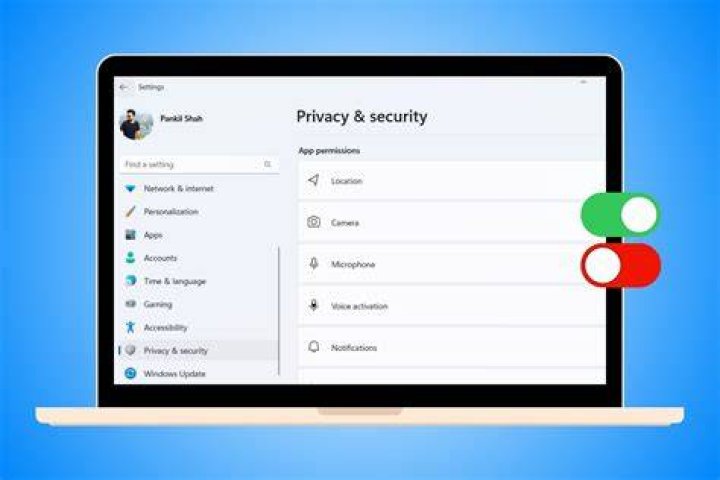
If you want a simple checklist mindset, think in layers: account, device, network, and app behavior. Attackers and trackers often exploit one layer at a time. By strengthening all four, you prevent the “single point of failure” that makes many privacy problems spread quickly.
Lock Down Your hitv Account Before You Stream
The fastest way to reduce risk is to secure your streaming account. Use a unique password created specifically for hitv, and store it in a reputable password manager so you don’t reuse credentials across services. If the platform supports it, enable multi-factor authentication (MFA) for additional protection against credential stuffing.
Next, review account recovery settings. Make sure the email address is still yours, the phone number is correct, and there are no unfamiliar login sessions. Many people skip this step because it feels like “maintenance,” but it’s also where you catch suspicious activity early.
Finally, be careful with “subscription” actions inside emails and pop-ups. Phishing campaigns often mimic streaming service notifications to trick you into entering credentials. Instead of clicking links from unexpected messages, type the service address manually or open the official app and verify status there.
Recognize Credential Stuffing and Phishing Patterns
Credential stuffing usually happens when attackers try password lists from previous breaches against other logins. If your password is reused, you’re effectively giving attackers a head start. Phishing, on the other hand, tries to trick you into voluntarily handing over your credentials through a fake sign-in page.
To defend against both, use a unique password, enable MFA, and treat unsolicited “account verification” messages with caution. If something is urgent but vague—like “payment failed, verify now”—pause and verify through the official app first.
Control Device Permissions That Can Reveal Your Viewing
Streaming apps often request permissions related to location, storage, notifications, and sometimes background activity. While you may not notice any difference day-to-day, these permissions can increase the amount of device data available to apps and related services. That can be especially relevant on mobile devices where ad identifiers and permission scopes make tracking easier.
Start by checking your device settings and reviewing app permissions for hitv and any related services installed on the same device. Disable permissions you don’t need—such as location access—if the app doesn’t require them for functionality. Also review notification settings to limit marketing messages that could include tracking links.
Reduce Background Activity and Unnecessary Tracking
Many privacy issues become worse when apps run in the background or refresh too frequently. On mobile devices, limit background data usage for non-essential apps and consider enabling “data saver” modes when available. On desktop systems, keep streaming software updated and avoid installing sketchy browser extensions that claim to “enhance streaming” but actually gather data.
It’s also smart to audit installed add-ons. Browser extensions can access browsing context and sometimes attach trackers to web requests. If you don’t recognize an extension or it doesn’t have a clear purpose, remove it.

When you tighten permissions, you’re not only reducing data exposure—you’re also improving performance by preventing unnecessary background work.
Secure Your Network to Limit Metadata Leakage
Network security matters because your streaming traffic uses endpoints that can be observed by your internet provider, Wi-Fi router, or local network devices. While encrypted connections protect content from being read by intermediaries, metadata can still reveal patterns such as when you watched and which service you used. You can reduce risk by using safer network practices and reducing reliance on insecure public Wi‑Fi.
Whenever possible, use a trusted home network. If you must use public Wi‑Fi, consider a reputable VPN to add an extra layer between your device and the local network. Avoid networks that require excessive permissions or sign-in steps you don’t understand, and steer clear of “free Wi‑Fi” portals that push you into installing unknown certificates.
Choose Safer Wi‑Fi Habits for Streaming
Turn off “automatic Wi‑Fi” connections if it tends to join networks you don’t trust. Use strong router settings such as a modern Wi‑Fi password, and change the default router admin credentials. If your router supports it, enable WPA3 or at least WPA2.
Also be mindful of router sharing features. Some routers expose device information to connected users within the local network. While this is usually not a major issue on a secured home network, it can become more risky on crowded public environments.
Use a Privacy-Respecting Browser Setup for Streaming Web Access
If you stream through a browser instead of an app, your browser configuration can influence privacy. Ad tracking often relies on cookies and fingerprintable browser characteristics, which can link sessions across sites. You don’t need an extreme setup, but a sensible baseline helps.
Start with tracking protection features in your browser. Enable “block third-party cookies” where possible, and review site permissions for the streaming site. Be cautious with “cookie manager” tools from unknown sources; they can introduce privacy concerns of their own.
Consider Cookie and Session Hygiene
Cookie hygiene is about reducing unnecessary persistence. If you share a device, consider signing out after streaming and clearing site data for the streaming domain only, rather than wiping everything. This reduces the chance that a future user on the same device inherits your session context.
If you use multiple profiles in your browser, consider using a dedicated profile for streaming. That way, your work or social browsing won’t mix with viewing activity, which reduces cross-context tracking.
These practices won’t stop all tracking, but they can meaningfully reduce cross-site correlation.
Make Ad and Analytics Tracking Less Personal
Streaming services often use analytics for performance and recommendations, and they may use ad technologies for monetization. Even when you can’t fully remove tracking, you can often reduce personalization and retention. The goal is not “zero tracking,” but less data being tied to your identity and fewer details stored for long periods.
Review privacy controls in your account settings and any “ad preferences” menus. If you have options to limit personalized ads, disable marketing communications, or opt out of certain data sharing categories, choose settings that align with your comfort level.
Also consider turning off “ad personalization” where your device provides it. On mobile devices and operating systems, there are usually controls related to ad identifiers. Adjusting these can reduce the ability for ad networks to build a consistent profile.
Understand What You Can and Cannot Control
It helps to be realistic. Streaming playback requires some form of telemetry to manage playback quality, handle errors, and protect content. That telemetry is not the same as invasive tracking, but it can still reveal usage patterns to the service.
Instead of chasing perfection, aim for control over the most sensitive aspects: identity linkage (your account), long-term storage, and cross-service correlation. That focus creates measurable privacy gains without breaking streaming features.
Avoid Accidental Data Exposure From Payments and Subscriptions
Your subscription information is valuable because it ties to identity and billing. Never enter payment details on suspicious pages or after clicking unexpected emails. When you can, use secure payment methods offered by major providers that support tokenization, so your raw card details aren’t exposed repeatedly.
Also keep your device and OS updated. Security patches reduce vulnerabilities that could otherwise allow malicious apps to read stored tokens or capture data during sign-in flows.
If you ever notice unexpected charges, login alerts you don’t recognize, or viewing sessions you didn’t start, treat it as a potential compromise. Change your password immediately, enable MFA if it’s not already on, and check active sessions.
Remove Unused Sessions to Contain Damage
Even if an attacker gets in, session management can limit how far they go. Many services provide a “log out of all devices” or “active sessions” overview. After a password change, use those tools to terminate sessions you don’t recognize.
For shared household devices, ensure each user has a separate profile where available. Shared profiles can blur viewing history and make it harder to spot abnormal activity.
Keep Software Updated and Watch for Risky Add-ons
Outdated apps and browsers are a common security weakness. Updates often include fixes for vulnerabilities that could enable account theft, data scraping, or malicious redirection. Make updating a habit rather than a one-time event—especially for anything that can access your streaming sessions.
In addition to system updates, review third-party software on your devices. Be cautious with “downloaders,” “streaming accelerators,” and unknown plug-ins. Even if a tool seems helpful, it may include spyware, adware, or scripts designed to capture credentials or traffic patterns.
Choose Trusted Sources for Extensions and Tools
Stick to official app stores or reputable extension marketplaces. If an extension requests broad permissions you don’t understand—like reading all websites’ data when you only need a streaming-related feature—avoid it. More permissions usually means more access, and more access means more risk.
If you’re using hitv through a smart TV or streaming stick, also update firmware regularly. Device firmware is part of your security boundary, and outdated firmware can create vulnerabilities even when the streaming app is current.
Use Safe Session Practices That Help in Real Life
Sometimes the best privacy wins come from behaviors you already do—just applied more deliberately. Don’t save passwords in shared locations, especially if you log in on kiosks, hotels, or work devices. If you use the same device for both personal and shared accounts, create separate user profiles where possible.
When you finish streaming, you can sign out, especially on shared devices. If the app provides an option to remember devices, consider whether that’s appropriate for your environment. For personal devices you control, convenience may be worth it; for semi-public settings, it often isn’t.
Be Careful With Screen Sharing and Casting
Casting can expose more than you think. Screen mirroring and casting sometimes display on-device notifications, previews, or login prompts. Before casting, review notification content and disable previews if your device supports it.
If you cast to a smart TV, ensure that the TV and the casting device are on a secure network. A poorly secured Wi‑Fi environment can expose connection details within the local network.
These habits reduce accidental oversharing and help keep your streaming routine more private.
How hitv Fits Into a Safer Streaming Routine
Security and privacy aren’t only features you rely on—they’re routines you maintain. With hitv, you can keep your streaming experience smooth while applying the protective steps above, like securing accounts with MFA, tightening device permissions, using safer networks, and choosing privacy-friendly browser settings when streaming through the web.
Think of hitv as part of your overall setup. When your account is locked down and your device and network are configured responsibly, your streaming sessions are less likely to be interrupted by fraud and less likely to leak unnecessary data to third parties.
Final Thoughts
Safe streaming is achievable when you focus on the biggest risk points: account protection, device permissions, network hygiene, and privacy controls that reduce personalization. Apply these practices consistently, and you’ll lower both security threats and data exposure without turning streaming into a chore. If you choose hitv as your streaming platform, pair it with these protections to keep your viewing experience both enjoyable and more secure.
Sources [CDC](https://www.cdc.gov/) [FTC Privacy and Security Guidance](https://www.ftc.gov/business-guidance/privacy-security) [Google Safety Center](https://safety.google/) [NIST Cybersecurity Framework](https://www.nist.gov/cyberframework) [NIST Special Publication 800-63 Digital Identity Guidelines](https://pages.nist.gov/800-63-3/) [Apple Security](https://support.apple.com/security) [Microsoft Security](https://www.microsoft.com/security)
Keep Learning
